
BOMBANANA Blind Monkey
The only hands on the bomb. Hear Deaf, feel the panel, report, then act once.
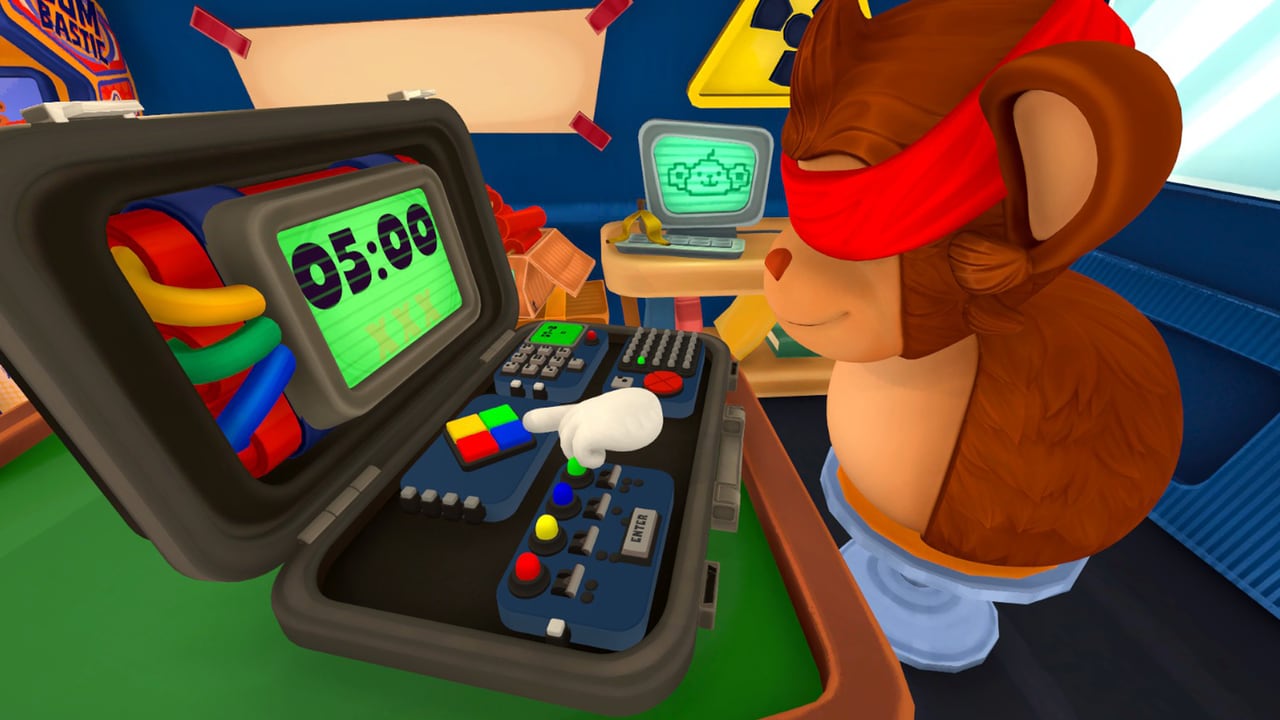
Blind Monkey is the only operator in BOMBANANA. If a wire is cut, a D-pad is pressed, a numpad key is mashed, or a switch is flipped, it is this role doing it. Lefto Studio’s Steam page (app 4656000, published by TARK) is blunt: you cannot see the bomb’s colors or read screens. You can touch the case. That is the job.
Ignore any write-up that also makes Blind mute or deaf. Steam flavor text jokes about the three wise monkeys. Live play does not. Blind hears Deaf Monkey speak instructions, and Blind reports tactile facts out loud so Mute Monkey can hear them. If you sit Blind and mute your microphone, the triangle dies on the first braille panel.
Read this page with the roles hub open. Assign before the timer. BOMBANANA released September 2, 2026 as exactly-three-player online co-op on Windows and macOS. There is no solo operator mode.
What you can and cannot do
You can locate the briefcase by feel, park both hands on a module, read embossed dots, and execute one confirmed input. You can hear Deaf. You can speak. You cannot verify a color, a printed number, an LED, or a timer digit with your own eyes. Colorblind modes (two types) exist for the sighted players; they do not paint the world back in for you.
Your two useful sentences are reports and repeat-backs. A report is a fact only you can know: “braille center feels like five,” “four wires under my fingers,” “switch two is already up.” A repeat-back is the instruction you are about to execute: “cutting second from my left, the one you called blue.” Then you wait for confirm. Then you input once. The shape is in the communication guide and the callout sheet: module name, position, details, manual answer, repeat-back, confirm, input.
Left and right are yours. Deaf may be standing on the opposite side of the case. Mute may be facing the manual, not the bomb. If the team does not lock “left means Blind’s left” in the lobby, Direction modules become coin flips. Say it once in lobby setup and do not renegotiate mid-bomb.
Braille is your job, not a flavor extra
Several families hide a value only you can read. Direction / D-pad is the clean example: a center value in dots, an LED color you cannot see. You report the dots. Deaf calls the light. Mute looks up the arrow. Mute gestures to Deaf. Deaf speaks the direction. You press that arrow from your own left/right, not from the camera that looks nicest.
Do not guess dots. Teammates who can see a panel still cannot feel it. If Deaf fills in a number because the timer is ugly, you are no longer playing Blind — you are playing a four-handed liar. Stop, re-feel, report again. The module guide lists which families need a tactile report; the module rankings flag Direction and CHAOS as high operator load because they keep your hands busy while the other two are still talking.
CHAOS modules in the full game are built to occupy you. Lefto Studio described three CHAOS modules as special puzzles designed to keep Blind busy, on top of eleven new standard modules. You will be mid-input on one panel while Mute is still encoding the next. Your discipline is not speed. It is refusing to queue a second action before the first repeat-back is done.
How you work with Deaf and Mute
The chain the team should run is: Mute reads the manual, Mute gestures to Deaf, Deaf speaks to you, you act, you repeat back. You are the last moving part, not the first planner. That still leaves you a lot of talking.
- Hear the whole packet before you move. Module name and position first, or you may be on the wrong panel.
- If the packet is missing a detail that module needs, ask for that detail. You cannot see it, so “just cut a red” is not an instruction you can obey.
- Repeat the action in your own words, including position from your left.
- Input once. Then say what you did, in the past tense, so Mute can hear the confirm even though Deaf cannot.
Deaf will not hear your confirm. They will watch your hands. Keep those hands still until the sentence is finished. Fidgeting looks like an input. Slapping and emotes exist for every role in the full game; they are not a substitute for a spoken repeat-back. Use the emote wheel to flag wait if your microphone clips, then still say the words.
Mute can hear you. That is how braille and switch-state reports enter the manual. Speak to Mute when you have a tactile fact. Speak to Deaf only in the sense that Deaf is watching you — they need the visual of your stillness, not a speech they cannot receive.
First-session habits that stop cheap explosions
Sit Blind if you can wait. The role rankings put Blind lower on communication load than Deaf and Mute for a reason: you are not encoding tables. You are still the only person who can waste a mistake. Wires are irreversible. Switch Enter commits a whole panel. Numpad keys on a jumbled pad punish pressing a position instead of a number.
Practice order for a new operator:
- One Wires module with a forced repeat-back, following Getting Started.
- One Direction module so you feel dots and own left/right.
- One Switches panel where you refuse Enter until every toggle is confirmed by touch.
- Only then a Numpad / Calculator, where you press the named digit wherever it sits, not the place it would sit on a phone pad.
Campaign’s 30 levels teach this in order. Endless waves will not. Custom knobs can strip the timer down until you start guessing. Do not use Custom to practice panic. Use it to isolate one family, as the mode rankings suggest. Airplane stages add obstructions and outages; your hands still work in the dark, so you become the team’s anchor when the lights die. That is not a reason to cut without a sentence.
If you are shopping hardware, Blind is the role that cares about a quiet mic and a mouse you will not bump. Specs sit on system requirements. Controls for feel-versus-click are on the controls guide. After a patch, re-check patch notes in case a module’s tactile layout moved.
Common Blind failures
Acting on a color you repeated from memory two modules ago. Cutting from Deaf’s left. Skipping the braille report because “it looks like a five” — you cannot see that it looks like anything. Queuing the next module while Mute is still on the current page. Treating CHAOS as optional busywork and ignoring it until the timer is a single digit.
Fix those with one rule: no input without a repeat-back that names the module and the position from your body. The rest of the squad can read Deaf Monkey and Mute Monkey to meet you in the middle. For a wider loop, return to the roles hub and the wiki hub.
Frequently Asked Questions
Quick answers for three-player bomb runs.
Can Blind Monkey hear and speak?
Yes. Blind hears Deaf's spoken instructions and reports tactile facts. Steam jokes about the proverb; gameplay does not make Blind mute or deaf. Mute is the silent role — see Mute Monkey.
Who is allowed to touch the bomb?
Only Blind Monkey. Deaf sees it. Mute holds the manual. If anyone else could operate the case, the triangle would collapse. Start from the roles hub.
What does Blind actually look at?
Not colors, not screens, not printed labels. You work by touch, silhouettes, and Deaf's voice. Colorblind modes help sighted players; they do not restore your view. Details in the module guide.
How should Blind call left and right?
Always from Blind's body. Deaf may be on the other side of the case. Lock this in lobby setup and keep it on the callout sheet.
Are CHAOS modules Blind's problem?
They are designed to keep Blind busy. You still wait for Mute's answer through Deaf before each input. Rank them by operator load on module rankings.
Should a new player start on Blind?
If they can wait for a confirm, yes. If they mash buttons under pressure, give them Mute for a round instead. Compare difficulty on the role rankings and the Deaf Monkey page.